

New Employee
What you need to know
Welcome! We are excited to support you as you embark on your onboarding journey and look forward to helping you integrate into your new role at Sandia.
Once you have completed the application phase (applying for a job, interviewing, and receiving a job offer), you can proceed to the pre-employment and onboarding steps based on your employment type below. These steps will guide you through accepting your offer, preparing to start and reporting instructions.
Initial Onboarding Actions
Onboarding Toolkit
As a new employee at Sandia, you’ll receive extensive information and guidance for your onboarding process through the consolidated New Employee Onboarding Toolkit, which covers many post-hire actions for your first year of employment.
Code of Ethics
View Sandia’s Code of Ethics and Standards of Conduct. We hold everyone accountable and ensure that our business is conducted consistently with high ethical standards. Watch the Ethics Overview video.
Set Up Your Profile
Building a strong network can enhance your career at Sandia. My Site is a tool to connect with other new hires, peers, and managers. Edit your profile by clicking on the My Profile tab on the top left corner. Include details about your education, job functions, assigned projects, skills, and personal hobbies and interests.
NEO (Day 1)
Congratulations on your first day with Sandia National Laboratories. View the presentations covered with you on your first day.
New Employee Orientation
Student Intern Briefing Presentation
Benefits
Total Rewards Benefits Presentation
Student Intern Benefits Booklet
Employee Health Services
Orient (Day 2-Month 1)
During your first month you will become familiar with Sandia. We aim to help employees feel confident and thrive in our culture. Learning about available resources and training will prepare you for your new role.
Badge Reader Basics
For tips on how to successfully present your badge to badge readers at Sandia, review the Badge Reader Basics security message, Guide to Sandia’s Badge Readers and the instructional video. For assistance, contact Technical Security at 505-844-2255 before visiting the Badge Office or chat with Security Connection or call 321 from Sandia landline.
Meet your Onboarding Buddy
An Onboarding Buddy is a respected employee who partners with a new employee during their first year. Responsibilities include providing information on daily aspects of working at Sandia and offering encouragement, knowledge, and resources to help the new employee integrate into Sandia’s culture and work environment.
IT Computer Assistance
Password Administration (PWA) is part of the Enterprise End-User Computing Services department, dedicated to providing Sandia with a secure and reliable computing environment.
Get help getting connected to Sandia systems and receive assistance in setting up desk space, computer access, and Information Technology (IT) resources.
Many Sandian’s work remotely or telecommute. Visit our Remote Work Site for more information and assistance.
Security
If you are uncleared, you must be escorted into limited areas. Any member of the workforce that is a U.S citizen with an active DOE security badge may escort you. While being escorted, you must follow all instructions and comply with security requirements regarding prohibited and controlled articles. For additional information, refer to Process: SS008.2 Hosting and Escorting Visitors and Uncleared Personnel.
Microsoft Authenticator is another layer of protection for Sandia information. To learn more about this, contact CCHD.
After obtaining your clearance, you must complete additional: SEC150 (Comprehensive Security Briefing) and SEC100 (Annual Security Refresher) are required for all individuals with a clearance or pending clearance. Check the status of your clearance.
Understand the Property policy and how it applies to you in your role and responsibilities when property is assigned to you.
Cyber Security makes every effort to protect Sandia’s IT environment, but your vigilance is needed for our continuous success.
Integrate (Months 2-6)
From month two to month six, we aim to introduce you to our company culture and connect you with Sandia’s corporate strategy, goals, and leadership direction. Your support team will help you learn about policy, performance, and ways to get involved.
Talent Communities
Talent Communities are available for employees to view content relevant to their position.
Laboratory Policy System
Find policies and business rules that establish Sandia’s lines of business in the Laboratory Policy System (LPS). View the Sandia Dictionary for information on common acronyms.
Time Outside of Work
Employee Service Groups
The Sandia Employee Recreation Program (SERP) and Livermore Laboratory Employee Services Association (LLESA) offer access to recreational activities, including sports leagues, social and hobby groups, fitness and entertainment discounts, and more. Membership is free for employees, students, temporary employees, and their family members.
KAFB Outdoor Rec
As guests on Kirtland Air Force Base, Sandians have access to KAFB Outdoor Recreation and facilities. Explore the great outdoors and rent available equipment , which varies by season. Visit the KAFB website for more information.
Excel (Month 7-Year 1)
If interested, join Sandia’s Culture Community of Practice
We encourage you to join Sandia’s Culture Community of Practice
Safety at Sandia
Emergency Management
Emergency Management protects the people, environment, information and property.
Building Emergency Program
The Building Emergency Program (BEP) prepares personnel for workplace emergencies and to react appropriately to protect life, property, and the environment.
Site Specifics
View information specific to the Sandia New Mexico site location.
View information specific to the Sandia California site location.
View information specific to Sandia’s remote locations.
Resources & Tools
Payroll
For information on time reporting and connecting with Payroll
Tier Board
The Tier Board is a weekly meeting for departments to share recognition, successes, and relay information from higher tiers (Executive, Division, Center, Group, Department).
Kirtland Airforce Base (KAFB)
Defense Biometric Identification System (DBIDS) is the Department of Defense requirement to gain unescorted access to KAFB through any means of access.
Members of the Workforce in NM are considered guests on Kirtland Air Force Base (KAFB). Visit the KAFB website and learn more about working on the base.
Virtual Work
How-To Guides
Learn how to reserve a conference room and check availability.
Fleet Services is the go-to for government vehicles or motorized equipment (GV/ME) for short-term use or long-term projects.
Find and install printer drivers on your Sandia computer.
Your Office Administrative Assistant/Office Management Assistant can help you get office supplies.
Occupational Segmentation
View resources available to specific job roles and transitions that may be helpful to ensure a streamlined approach to onboarding.
View Manager resources.
View R&D-focused onboarding guides organized by tenure for 0-3 months, 4-6 months, 7-12 months and 13-24 months.
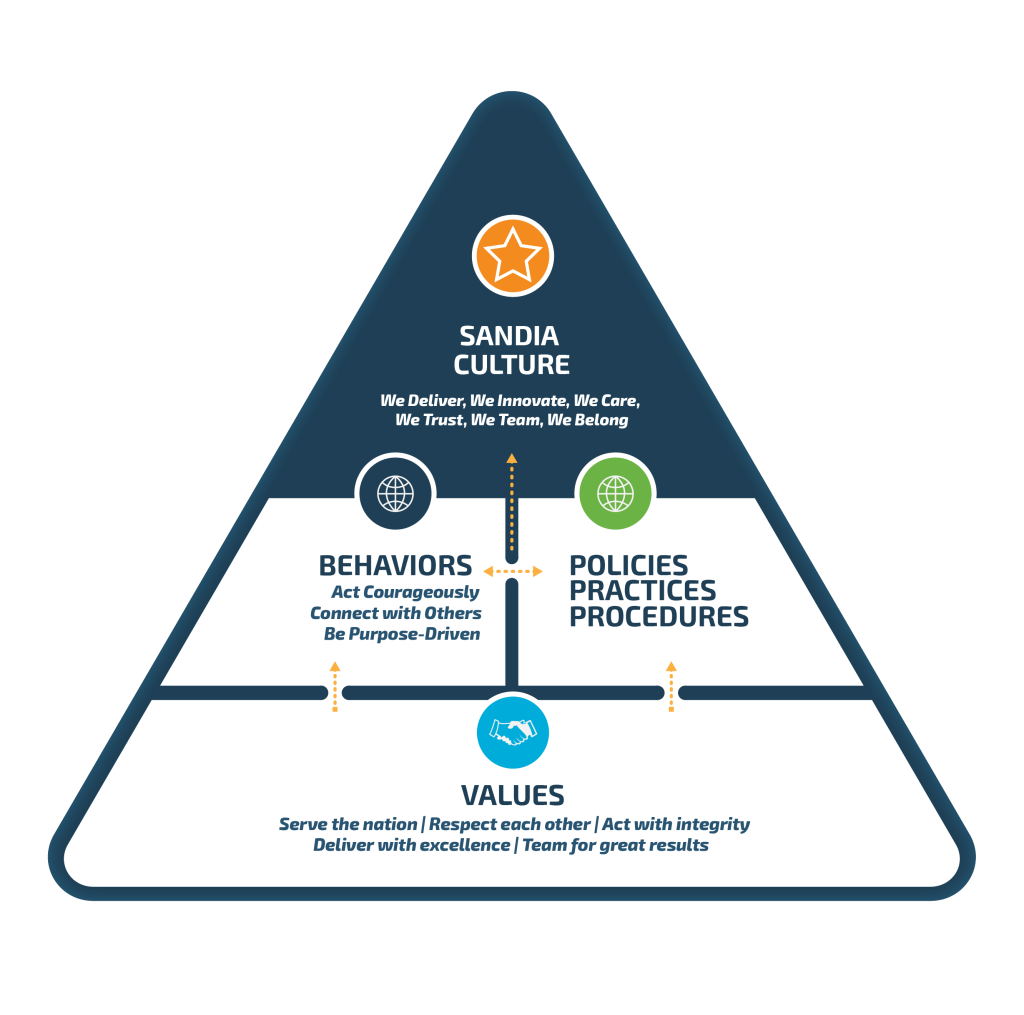
To achieve our culture
—an environment where all Sandians can innovate, have a sense of belonging and thrive—we must intentionally align our values and our behaviors to all the characteristics that define our culture.